Campaign Diagnostics · Intuit · 2026
A report on every support request, to find what Marketing Studio could diagnose itself
- Marketing Studio is Intuit's platform where marketing teams build and change campaigns by talking to AI agents.
- When a campaign broke, the only place a marketer could go for help was a support channel, staffed by a few engineers and operations people.
- This project: I used Claude Code to work through eight months of that channel, coded every request by its cause, checked the coding by hand, and designed a report that shows which failures the product should diagnose and fix on its own.
- Outcome
- Demoed to marketing operations and product partners and shared as the team's reference. Its nine recurring patterns became the candidate list for in-product diagnosis
- My role
- Research design, analysis and synthesis, information architecture, interaction design and the prototype
- Team
- The only designer, reviewed by my principal designer, with marketing operations and product partners
- Timeline
- About two weeks, late October to early November 2026, alongside other work
Details changed, and every request, name and ID in the visuals is invented, to respect client confidentiality.
- Claude Code
My partThe only designer, with my principal designer reviewing. I decided what the report had to answer, and used Claude Code to go through all 204 support threads and sort every request by its cause; I checked the results by hand. I built the report as a working prototype, demoed it to partner teams and shared it with mine.
A support channel nobody had designed
When a campaign got no impressions, or an offer showed to the wrong customers, a marketer posted in the support channel. Most requests got an answer. But four things kept the real problem out of sight.
- Nothing was kept.Every fix stayed buried in the thread where it was found. When the same cause came back weeks later under a new campaign number, there was no easy way to find that fix again, and no count of how often any problem had happened.
- Finding the owner took longest.Most of a long thread went on working out which team owned the fix. Requests with no obvious owner went unanswered.
- Every answer needed a person.Only someone on support could answer, one question at a time. Even the questions marketers could have solved themselves waited in the same queue.
- The product couldn't see any of it.Marketing Studio was being designed to diagnose and fix campaign problems. Nobody knew which problems were worth building for, how often each happened, or which ones the product could fix itself. That was the design problem.
# the support channel1 thread · 41 replies · 6 days
Campaign manager
Spring savings banner went live Monday and has zero impressions. Can someone take a look? CMP-2041
Operations lead
Checking. Is the audience attached?
Campaign manager
Yes, the same audience as last month.
Platform engineer
The offer qualifies in the logs, so it isn't targeting. Who owns the banner access point?
Operations lead
Not sure. Maybe the web team?
- 34 more replies over 6 daysMostly: who owns this?
Web team engineer
Found it. A page change last sprint stopped the access point asking for offers. Reverted.
Reply 41: the fixSame cause as three earlier threads, under other campaign numbers
The question I set myself
What are teams asking the support channel for, what's causing it, and which of those causes could the product catch and fix itself?
I had eight months of the channel to work from: about 300 posts and 3,400 replies. The useful part was almost always in the replies.
Two groups would read the result. Managers wanted the overall picture quickly. Product partners wanted to open any one request and see what happened. The threads name customers and colleagues, so everything stayed on internal hosting.
I built it for our own review of the scenarios, but in Marketing Studio’s design system. I’d already written enough Claude skills for that system that it was the quickest way to a clear, well-organised report. That choice mattered: because it looked like part of the product, people started seeing it as a view Marketing Studio could have.
How I worked through it
1 · Cover every thread
The answers were in the replies.
Claude Code went through all 300 posts and all 204 threads. A sample would have missed the rare, expensive cases: an outage that took a bridge call, an ownership dispute that ran to 135 replies. Every thread was logged the same way: who asked, where, the ask, the cause the thread found, the fix, the outcome and the time to first response.
I didn’t read every thread myself: at that volume, Claude Code did the reading. My part was deciding what to look for, the coding scheme, checking the results by hand, and what I made of them.
2 · Code by cause
"No impressions" explains nothing.
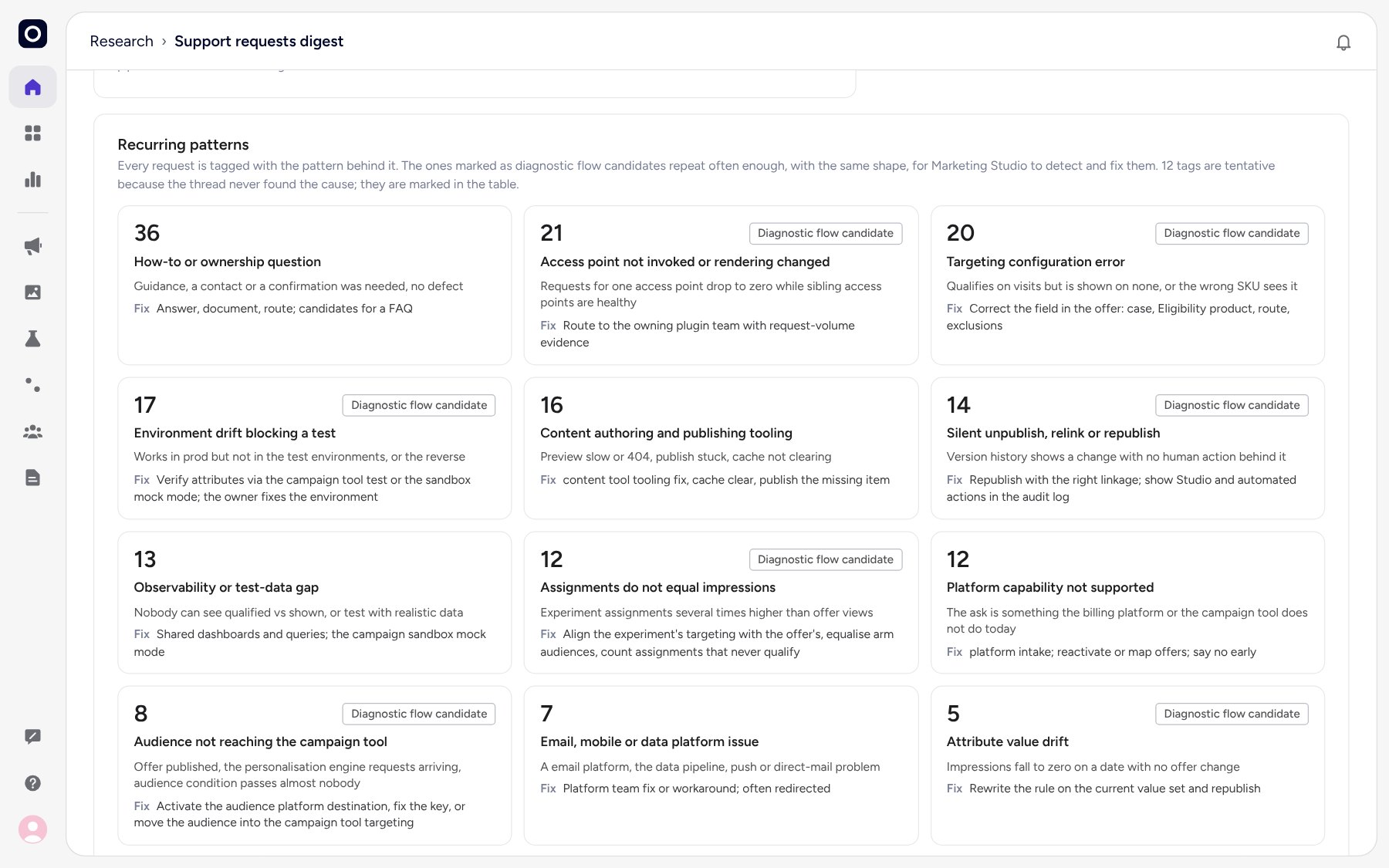
Grouping by what the marketer saw put about 60 requests in one bucket. So I grouped them by where the problem actually was in the system: eight types. Within those, I found 15 recurring patterns, each with the sign that gives it away and the fix that solves it. Nine repeat often enough, in the same shape, for the product to detect and fix them itself.
The tagging ran in three passes: tag every row, re-read every tag independently, then check all 190 for rows that looked alike but were tagged differently. Twelve tags where the thread never found the cause are marked "tentative" in the report.
By symptom
By cause · 8 types
- Content, pages and environments39
- Experiments and Studio wiring34
- Access points and rendering27
- Audience and attribute data24
- Targeting configuration22
- Offer catalog and Targeted Offers19
- Observability, testing and tooling14
- Email, mobile and other channels11
15 recurring patterns
The product could catch it · 9Other patterns · 6
- How-to or ownership question36
- Access point not invoked or rendering changed21
- Targeting configuration error20
- Environment drift blocking a test17
- Content authoring and publishing tooling16
- Silent unpublish, relink or republish14
- Observability or test-data gap13
- Platform capability not supported12
- Assignments do not equal impressions12
- Audience not reaching the campaign tool8
- Email, mobile or data platform issue7
- Attribute value drift5
- CTA and deeplink hygiene4
- Priority tie or offer competition3
- One-off2
3 · Design the report for two readers
Start with eight groups. Open any request in one click.
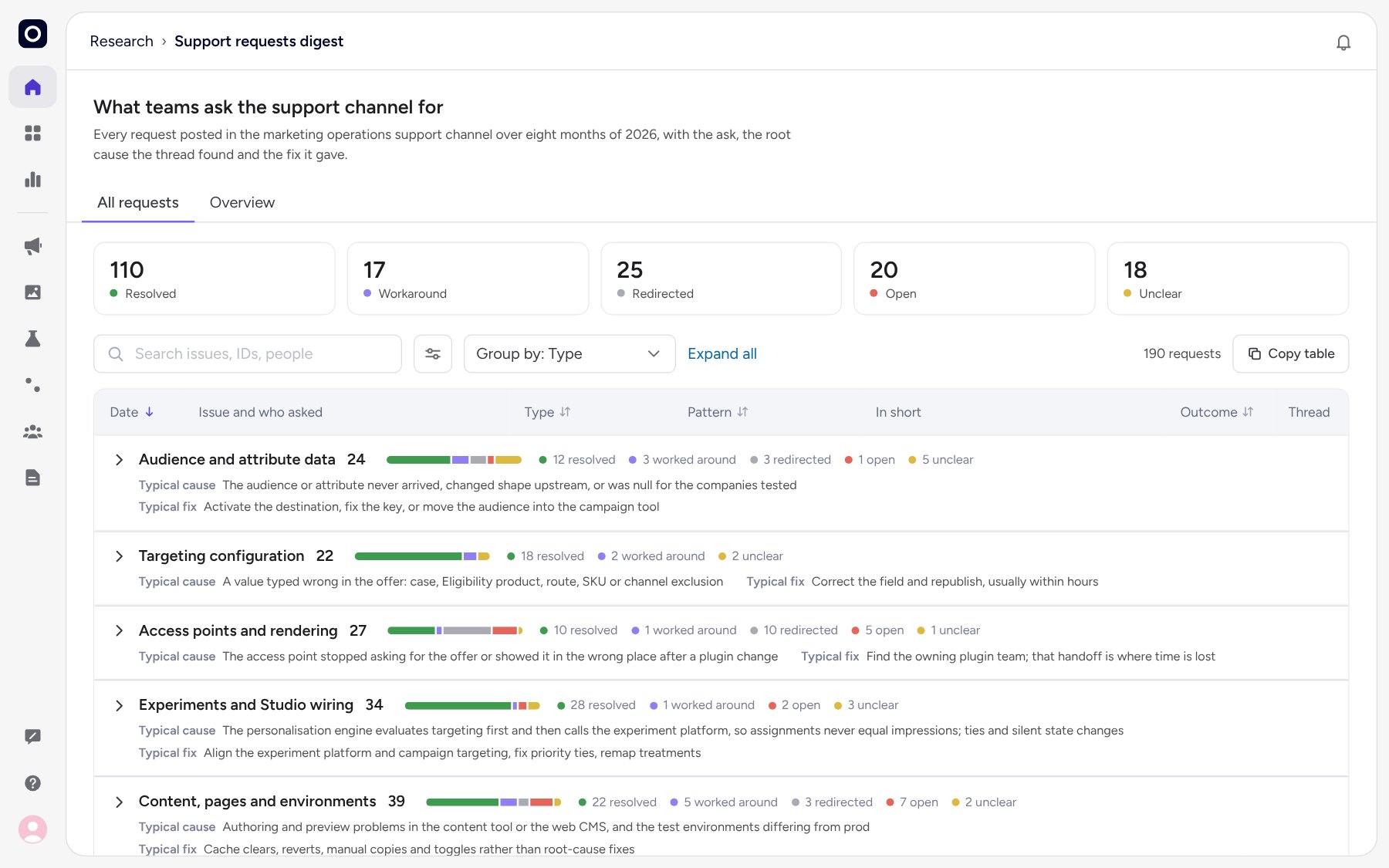
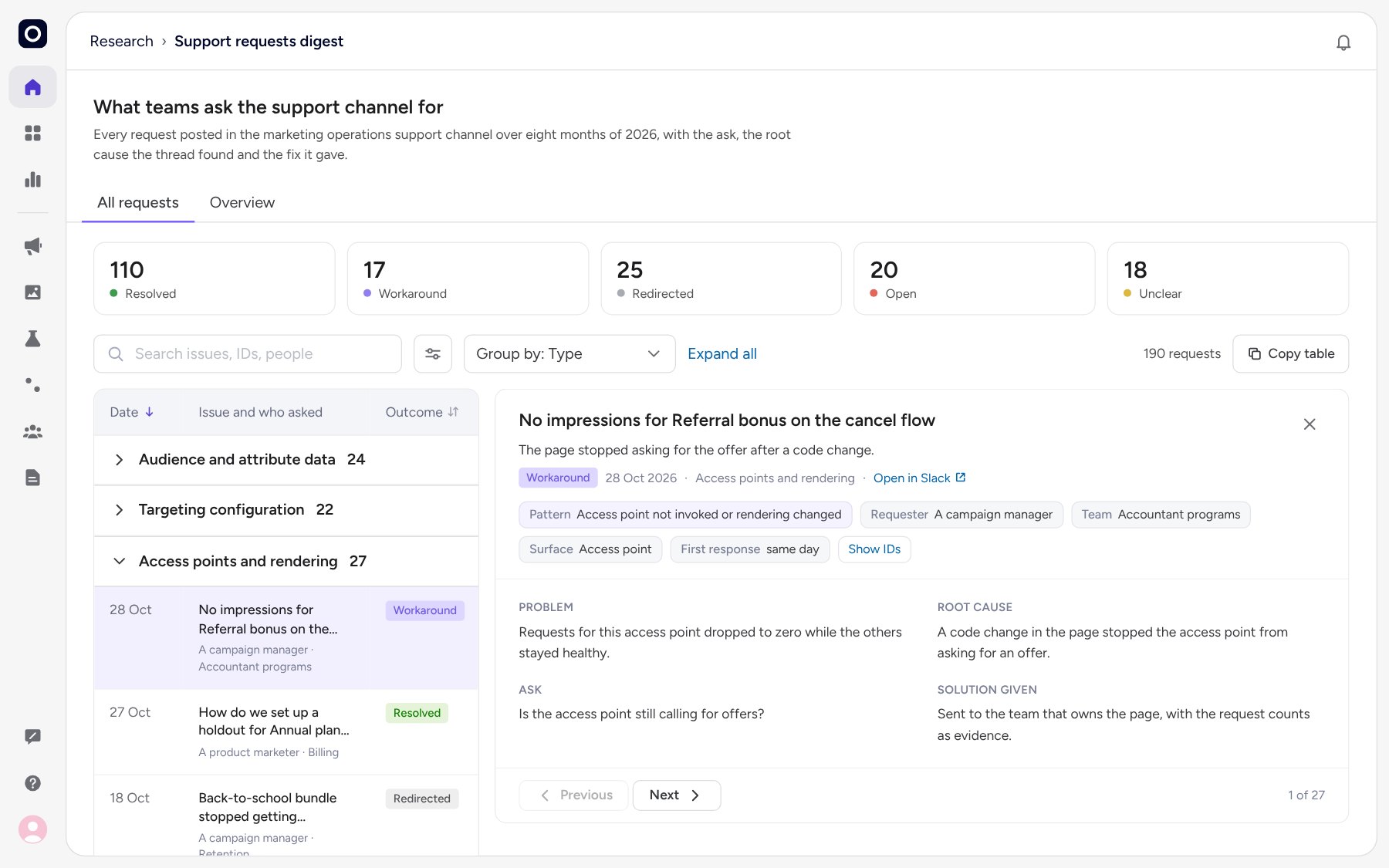
The list opens grouped by type, with all eight groups closed. Each shows its count, a bar of how its requests ended, and the usual cause and fix, so a manager can read the whole channel at a glance. Open a group to see its requests, each with a one-line summary.
The first version was one long sortable table. Clicking a row opened a drawer that dimmed the table and stacked everything in one column. I changed it to a split view: the list stays on the left, the request opens on the right, and you can step through requests with the keyboard.
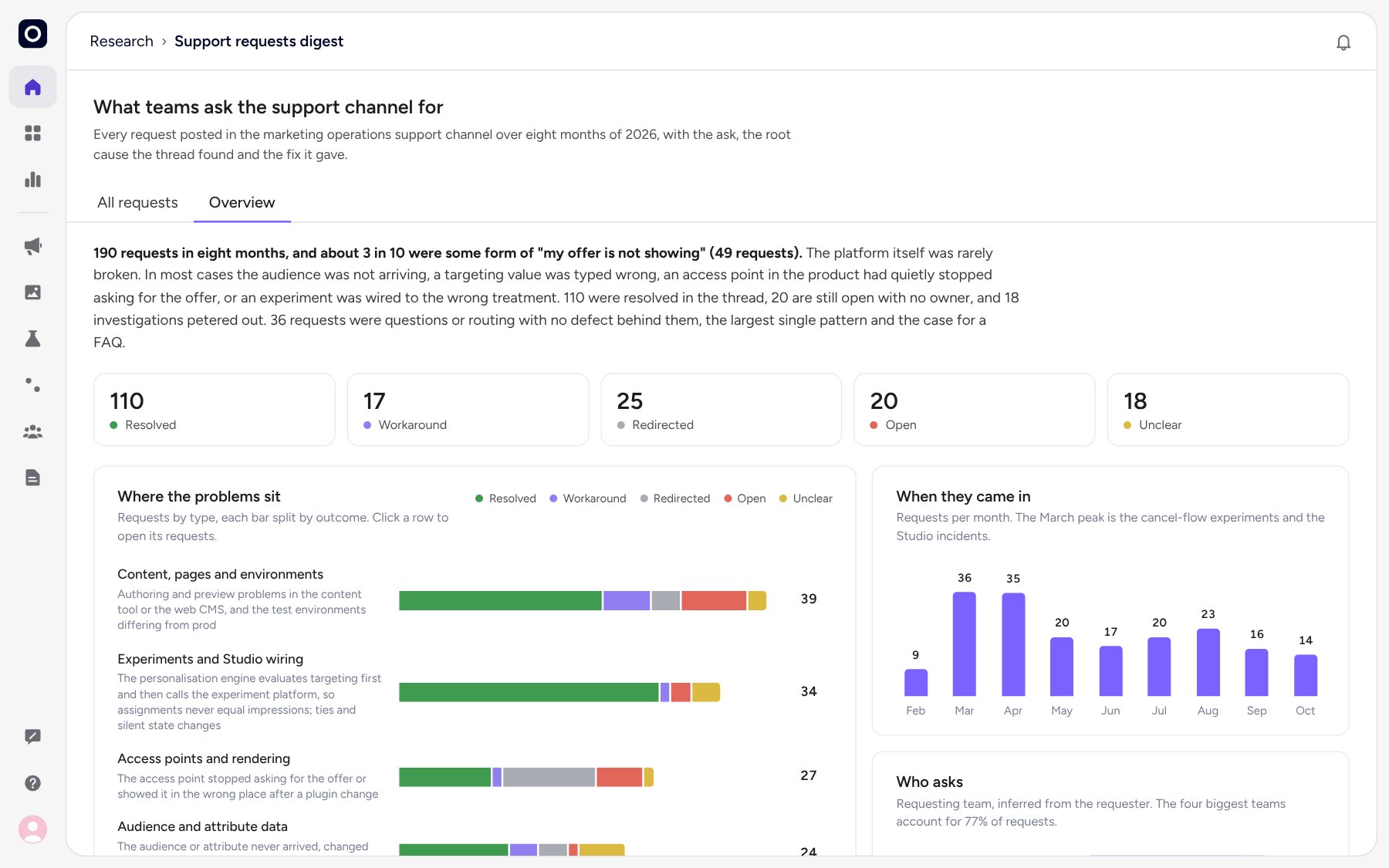
Then an Overview tab gives the big picture first: where the problems sit, when they came in, who asks, the recurring patterns and what still needs an owner. Every number on it opens the rows behind it.
- List first
- The team reads it as a reference before a summary, so after review the list became the first tab and the Overview the second.
- No pagination
- People read it rather than work in it, so one scrolling list keeps every request a search away.
- Outcome colours only
- Green, purple, grey, red and yellow mean an outcome and nothing else, so a bar can be read at a glance.
- Shareable
- Any view can be shared as a link and copied as a table.
4 · Ask what the product would have said
From research to product behaviour.
For every request I wrote the question the person would have typed into Marketing Studio instead of the channel, a verdict on whether the product could resolve it, and the reply it would give: a diagnosis with a change order when it can fix the problem, or, when the fix sits with another team, the evidence, the owner and a summary it posts to the support channel for you, tagging that team.
- 41Diagnosed and fixed in the product, as a change order
- 65Diagnosed in the product, with the fix handed to another team
- 84Outside the product: questions, platform limits, other channels
What people were missing
- 190times in eight months a marketer needed help with a campaign and had nowhere to take it but a busy support channel.
- 36were simple questions: how do I, or who owns this. Answers people should have found where they work.
- 21never got an owner or a fix. The person who asked was left waiting.
There was no one place to go with a campaign problem. People posted in a channel and waited while others worked out whose problem it was. I did this research to find out which of these problems the product could answer itself, so marketers get help inside Marketing Studio, and support has time for the problems that really need a person.
From anecdote to evidence
Before, nobody could say how often a failure happened or whether the product could fix it. Now there's a count for every pattern and a verdict for every request.
- The report was demoed to marketing operations and product partners, and shared as the team's reference for channel requests.
- The team now treats it as the shape of a possible in-product view.
- The nine recurring patterns became the candidate list for Marketing Studio's diagnostic flows, each with the signal to detect and the fix to offer. One, an access point that stopped calling the product, is already a prototype flow that answers in the product and, since the fix sits elsewhere, posts the summary to the support channel and tags the owning team.
- The channel got its first list of requests that had never found an owner.
If the diagnostic flows ship, the measure becomes how many channel requests they absorb, and this report is the baseline. The support channel resolved those requests, and the report doesn't take credit for them.
What the partners said, and asked for next
A marketing operations lead and a campaign manager reviewed the report and the diagnostic flow together.
- The drafted hand-off was highly valuable for explaining a complex technical issue quicklyAlerts before anyone asks: when an access point or attribute fails, say so, and name the team that owns it
- They wanted to start a diagnosis from the channel, not only from the productTrigger a diagnosis from a channel message and answer it there
- A dedicated view beats chat for spotting patterns, tracking open items and summarising for leadershipTreat it as a product surface
- Both valued copying the table, to share reports and build their own chartsExport formats beyond the clipboard
One I'd add next: an assignee on the hand-off. Today the agent posts the summary in the support channel and tags the owning team, then waits for a reply in the thread. Picking the owner in the product, say "Assign to: Web team", would also give every fix an owner you can track in Marketing Studio. That goes straight at the slowest part of the old threads: finding who owns the fix. It needs a map of which team owns what, and a channel post stays the fallback for teams outside Marketing Studio.
What it could become
A concept, not built. When the fix sits with another team, the agent today drafts a post for the support channel. But the report already holds what that post is missing: every past request, coded by cause, owner and fix. With that history, the agent could say: I can't fix this, but here's what happened, and here's who fixed it last time.
- The analysis lives on the canvas
- Each question adds a chart or a table you can keep reading, instead of a paragraph that scrolls away. The conversation stays short, and the evidence stays on screen.
- The channel's history becomes the agent's memory
- Coded by cause, owner and fix, past threads let the agent name who fixed the same failure last time, and send that fix along with the hand-off.
- It stays on the problem
- After the hand-off it watches the numbers, says when they recover, and logs the case, so the next one starts with an owner instead of a search.
What I learned
- Sort by cause from the start
- My first pass sorted requests by what the marketer saw, and most of them landed in one big pile. Sorting by what actually broke is what showed the patterns and gave the product something to build. Next time I'll decide the categories before going through the threads.
- My first design suited me more than its readers
- A long table with a side drawer worked while I was exploring. Managers wanted the story first. The overview and the collapsed groups came from watching someone use the table, and from hearing that the drawer "condensed everything to the right".
- Using AI at this scale means designing how to check it
- Reading 3,400 replies by hand wasn't realistic, so Claude Code did the reading. My work was deciding how to check it: every tag read a second time on its own, a pass to catch similar requests tagged differently, and unsure tags marked where readers can see them. Where the report guesses which team asked from who posted, it says so.
- The extra step I'd keep
- Writing what the product would have said to each request wasn't in the brief. It turned a research report into a product proposal, and it's why the team now talks about building this view into Marketing Studio.
- What I'd do differently
- I'd tag the recurring patterns before building the overview, so it opens on them rather than on the broad groups. And I'd set up a regular data feed, so the report stays current instead of being a one-off.