Continuous discovery · Intuit · 2026
Testing my designs with marketing operations every week, so we build for the scenarios they really meet
- Marketing Studio is Intuit's platform where marketing teams build and change campaigns by talking to AI agents.
- An experience is one offer and its setup: which customers get it, what they see and where in the product.
- Marketing operations set up and run those campaigns: hundreds of experiences at a time, across several systems and two compliance approvals, where a mistake reaches customers.
- This project: an ongoing discovery program. Our team designs the flows; in each session I show the working prototype to marketing operations, and their reactions tell us whether we designed for the real scenario. Once a week as a rule, and recently twice a week while we design the bigger features.
- Outcome
- Four shipped features the sessions shaped, among them validating experiences against the workbook. Some of what came out of the sessions was on no roadmap
- My role
- Presenter in 16 sessions, with my lead, a principal designer, co-hosting and asking questions alongside me. In six of them we presented together
- Team
- Our design team, a product sponsor and marketing operations
- Timeline
- 16 July 2026 to now, in a program running since March; weekly, and recently twice a week
Screens are redrawn with invented names, IDs and numbers, and users' words are paraphrased, to respect client confidentiality.
- Figma
- Claude Code
- Google Docs
- 16sessions I've presentedsince 16 July 2026, my lead co‑hosting; still running
- 2×a week, recentlyup from once a week, while we design the bigger features
- 4features shaped in the sessions and shippedsome of what came out of them was on no roadmap
My partPresenter, with my lead co-hosting. We pick each topic for the release; I show two or three versions as working prototypes, listen for the scenario we haven't designed for, and take what we hear into the next prototype, often the same week.
Marketing operations know the edge cases
Marketing Studio was taking on targeted campaigns from an older tool. Our team designs the flows, but the cases that decide whether a flow works show up when you set up campaigns every day. These sessions put each flow in front of the people who do, before it is built.
- Many systems, one experience.One experience spans several systems, each with its own dates and IDs. Operations know where those systems disagree.
- Checked twice.Compliance approves every change, so every screen has to answer what changed, from what, to what.
- Each old feature has to earn its place.The older tool had years of features. Each needed a reason to come across, and users know which ones they still need.
- Each tool has its own words.The same thing had different names across tools and teams. Users know which word they actually use.
A 30-minute focus group, every week
My lead set up the program in the spring, and I joined as a presenter on 16 July. She co-hosts every session and asks questions alongside me, and most weeks the designs on screen are ones I worked on. We meet once a week, and lately twice, while the bigger features are in design.
- One group, many roles
- Usually a flow goes to one person at a time, the same screens shown six times over. Here the whole group sees it together. Each of them handles a different part of the same campaign, so they talk it through among themselves in front of us, and we hear several views in one sitting.
- We pick the topic
- By priority, agreed with the PM and users for the release. We share it the day before, so the people it affects can join.
- Working prototypes
- Built with Claude Code, often two or three versions of a flow. Figma only in the earliest sessions.
- The real scenario
- Their answers tell us whether we designed for the real scenario, and if we didn't, what it is.
- Written down
- Decisions, open questions and owners in a shared Google Doc after every session.
- We pick the topicBy priority, agreed with the PM and users for the release
- I show two or three versionsWorking prototypes built with Claude Code
- The group reacts togetherEach person runs a different part of the campaign, so they discuss it among themselves
- We hear the real scenarioWhether we designed for it, and if not, what it is
- The next prototypeBack to the same group, often that week
What sixteen sessions produced
Most sessions ended with something concrete: a feature, a requirement nobody had written down, or something we chose not to build. Some of it was on no roadmap.
Shipped4
- Validating experiences against the workbookOn no roadmap before the sessions; now one of the most used features
- Cloning experiences in bulk
- The experience change log
- Comparing an audience before and after a change
New requirements4
- Check every field against the workbook
- Show every change from and to, for two approvals
- Clone one experience into a set
- Check targeting and billing, beyond the copy
Several have since shipped
Cut or deferred4
- An export to track clones
- Mapping every field before cloning
- A campaign-level change log
- Rolling back whole campaigns
In design now2
- Preview in the real page, with clashes flagged
- A drafted summary when something breaks
Four features the sessions shaped, all shipped
1 · Validating experiences against the workbook
Every experience checked against the plan before it goes live.
- The job
- Before an experience goes live, marketing ops check it against the workbook, the spreadsheet the campaign was planned in.
- Before
- By hand, row by row, switching between the workbook and Marketing Studio.
- What ops told us
- The check covers far more than the copy: targeting, audiences and billing. None of it was on the roadmap.
- After
- The agent checks every experience and says how many match. On the canvas, each mismatch shows the workbook's value beside Marketing Studio's, with the reason.
- Result
- Shipped, and now one of the most used features.
Before · checked by hand
What shipped · from a session in October
Checks have to cover targeting and billing, beyond the copy.
Marketing operations
2 · Cloning experiences in bulk
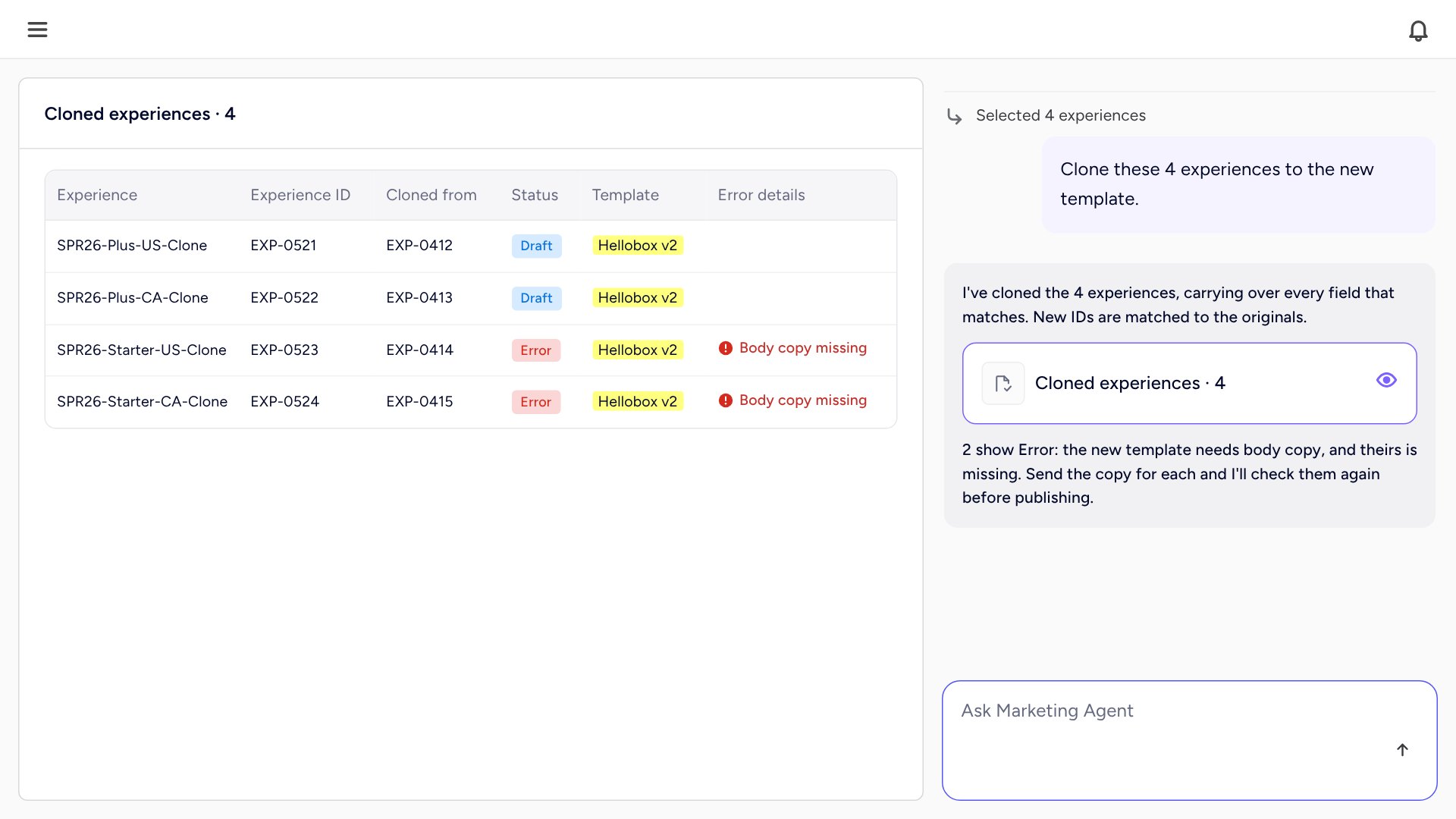
Create the clones first, then fix the few that need it.
- The job
- Reusing experiences by cloning them, often many at once.
- Before
- The agent asked for each clone's layout, where it appears and its text before creating any, because the backend needed them first.
- What ops told us
- Each clone needs its own fixes anyway, and matching new IDs to old ones took hours.
- After
- The team changed the backend. Clones are now created at once as drafts, values carry over, IDs are matched, and only what needs a fix is flagged.
- Result
- Shipped in the November release, with one-to-many cloning and version tags at the end of names added in later sessions.
What I brought · 3 Sep session
What shipped · after the September sessions
Every experience is different. Make the clones first and let us fix them one by one.
Marketing operations
3 · The experience change log
Who changed what, inside the whole experience.
- The job
- When an experience stops showing, marketing ops check its log first to see what changed.
- Before
- The older tool had a log, but it showed changes as code, and changes from connected systems only as "system user". Ops didn't use it; they asked other teams.
- What ops told us
- Who made a change matters most. And my first version, which showed only the fields a change touched, wasn't enough: they needed the whole experience as it stood.
- After
- A table of every change: what it touched, who made it, the event and the date. Opening one shows the whole experience before and after, across every tab, with only the changed values highlighted.
- Result
- It's a new feature in practice, designed over three sessions and shipped in the November release.
What I brought · 24 Sep session
Changed the headline and the end date.
CreativeUpdate9 Oct, 16:12J. Moreno
| Fields | Before | After |
|---|---|---|
| Headline | Save 30% on your first year | Save 40% on your first year |
| End date | 30 Nov | 15 Dec |
Only the fields that changed
What shipped · after sessions in October
Changed the headline and the end date.
CreativeUpdateVersion 39 Oct, 16:12J. Moreno
| Fields | Before | After |
|---|---|---|
| Headline | Save 30% on your first year | Save 40% on your first year |
| Body | Upgrade in two clicks. | Upgrade in two clicks. |
| CTA text | See plans | See plans |
| End date | 30 Nov | 15 Dec |
When an experience goes down, this is the first place we look.
Marketing operations
Seeing the high-level change while still seeing the whole experience really helps.
Marketing operations
4 · Comparing an audience before and after a change
Audience conditions, compared the way they're built.
- The job
- An audience is a set of conditions, some joined with AND and some grouped with OR. When one changes, ops need to see exactly what changed.
- Before
- I brought options: two expressions side by side, a before/after toggle showing one at a time, and a flat table.
- What ops told us
- Working through it together, we found the comparison had to keep the nesting, meaning which conditions sit inside which group.
- After
- The table, developed with users. It keeps the nesting (the root conditions, the OR and the attribute group) and highlights only what changed.
- Result
- Designed with the users, and shipped.
What I brought · 12 Aug session
What shipped · worked out with users
Before
AttributeplanType
equal to
ValuePlus
OR
Attribute group
Attributeregion
equal to
ValueUS
AND
AttributecompanyAge
greater than
Value90 days
After
AttributeplanType
equal to
ValuePlus
AND
AttributeisAccountant
not equal to
ValueYes
OR
Attribute group
Attributeregion
equal to
ValueUS
AND
AttributecompanyAge
greater than
Value30 days
| Fields | Before | After |
|---|---|---|
| Condition 1 | planType equal to Plus | planType equal to Plus |
| Condition 2 | — | isAccountant not equal to Yes |
| Condition 3 | region equal to US | region equal to US |
| Condition 4 | companyAge greater than 90 days | companyAge greater than 30 days |
| Fields | Before | After |
|---|---|---|
| Attribute | planType | planType |
| Operator | equal to | equal to |
| Value | Plus | Plus |
| AND | AND | |
| Attribute | — | isAccountant |
| Operator | — | not equal to |
| Value | — | Yes |
OR
Attribute group
| Fields | Before | After |
|---|---|---|
| Attribute | region | region |
| Operator | equal to | equal to |
| Value | US | US |
| AND | AND | |
| Attribute | companyAge | companyAge |
| Operator | greater than | greater than |
| Value | 90 days | 30 days |
Show us the audience as it was and as it is now, so we can check the change before approval.
Marketing operations
Smaller calls that saved the most time
Some of the most useful sessions ended with one word, or one thing we chose not to build.
- placementaccess pointthe word in their own guides10 Sep
- stagedraftit was already used everywhere else, and says plainly it isn't live16 Sep
- copiesclonescopy already means headline text1 Oct
- rollbacknew draftrestoring an old version creates a new draft22 Oct
- ReloadRefreshit only retries the page17 Nov
- An export to track clones
- The older tool lost its history when a session closed. Marketing Studio keeps it, so the export wasn't needed.
- The field-mapping step
- Removed, as above.
- A campaign-level change log
- Deferred. The experience's own log answered the urgent question.
- Rolling back whole campaigns
- Deprioritised in favour of rolling back a set of experiences at once.
What I've learned so far
- Bring options
- Showing two or three versions of a flow brings out more real scenarios than showing one.
- A group sees more
- When the people who handle different parts of a campaign react together, they correct each other, and the real scenario comes out faster than in one-to-one calls.
- Words are design
- Some of the biggest wins were one-word changes.
- Parity is a question
- Ask it every time. Some of the most useful sessions took something off the list.
- Next, the marketers
- These sessions hear from operations, the people who set up and run campaigns. As the work moves earlier, to where campaigns are planned, I want to run the same kind of sessions with marketers, so we design from a wider group and more than one role's view.